Your raw affiliate link works perfectly. But to your audience, it looks like this:
Readers hover before clicking. When they see tracking parameters, affiliate IDs, and third-party domain strings, trust drops — and so does your click-through rate. Link cloaking replaces that URL with something clean and branded, like yourdomain.com/go/product-name, while preserving every bit of tracking data your affiliate platform needs to pay you.
This guide covers four step-by-step cloaking methods, a side-by-side plugin comparison, the threat of affiliate decloaking (which most guides completely ignore), the critical difference between legitimate affiliate link cloaking and the black-hat SEO tactic that shares its name, and a full compliance section covering FTC rules and network policies.
What Is Link Cloaking and How Does URL Cloaking Work?
Link cloaking (also called URL cloaking or link masking) replaces a long, parameter-heavy affiliate URL with a short, branded redirect on your own domain. The visitor sees a clean link; your server handles the redirect behind the scenes, passing the visitor to the vendor's sales page while keeping your affiliate attribution intact.
When a visitor clicks your cloaked link, your server issues a 301 or 302 redirect to the vendor's page. Digistore24 reads the HTTP cookie stored at the moment of that first click and uses it to attribute any purchase made within the 180-day cookie window to your affiliate account. Cloaking sits between your link and the destination — it does not interrupt tracking, it simply hides the raw affiliate URL from view.
One important distinction up front: "cloaking" is also the name of a black-hat SEO technique where a website shows different content to search engines than to human visitors. That practice is a Google policy violation. Affiliate link cloaking is categorically different and entirely legitimate — both practices redirect visitors to the same destination. The distinction is covered in full below.
Why You Should Cloak Affiliate Links
- It builds trust and improves CTR. Readers routinely hover over links before clicking. A branded link on your own domain reads as a recommendation you stand behind; a raw affiliate URL with a third-party domain and trailing parameters reads as automated. The trust difference is subtle but real, and it compounds across every link on every page.
- It protects your commissions. Malicious browser extensions and scripts can scan a page for raw affiliate IDs and substitute their own. When your affiliate ID is buried inside a redirect on your own domain rather than visible in the page source, the attack surface shrinks considerably.
- It simplifies link management. Vendors update their Digistore24 promolinks when they refresh a sales page or move funnels. With a cloaking plugin, you change the destination URL once in your dashboard and every instance across your entire site updates instantly — no broken links, no lost traffic.
- It improves analytics. Digistore24's built-in tracking (cookie-based attribution, campaign keys, S2S postback) tells you what converted. A cloaking plugin adds click-level data before the visitor reaches the sales page — showing you which articles and link positions generate clicks. Combining both gives you a complete picture of what to optimize.
- The CTR case for cloaked links. While precise A/B data on link cloaking CTR is difficult to isolate at scale, the underlying psychology is well-established: users consistently rate URLs that appear to originate from a trusted brand higher in credibility than parameter-heavy strings on unfamiliar domains. A Nielsen Norman Group eye-tracking study found that link destination cues in the status bar influence click decisions, particularly for first-time visitors who have no prior relationship with a site.
- Choosing your redirect type. The redirect type you choose affects both SEO and tracking behavior.
- A 301 (Permanent) redirect is the standard choice for stable, long-term affiliate links — search engines understand it as a permanent forwarding instruction and pass through any crawl equity.
- A 302 (Temporary) redirect is appropriate for time-limited promotions, A/B split tests between two destination pages, or situations where you might want to revert.
- A 307 (Temporary Redirect) is similar to 302 but strictly preserves the HTTP method — useful for POST-based affiliate flows where preserving the request type matters. For the vast majority of affiliate use cases, 301 is correct. ThirstyAffiliates and Pretty Links both default to 301 and allow you to switch per link without touching any code.
Link Cloaking vs. Link Shortening vs. URL Masking
These three terms are often used interchangeably but describe meaningfully different approaches:
- A link shortener creates a link on a third-party domain — if that service shuts down, every link you have ever published breaks.
- A URL masker wraps the destination in an iframe, which Google has deprecated as a practice. For professional affiliates, link cloaking on your own domain is the correct approach.
How to Cloak Affiliate Links: 4 Step-by-Step Methods

Method 1: WordPress Plugin (Easiest — Recommended)
No coding required. A dedicated plugin handles redirects, click tracking, SEO attributes, and robots.txt exclusions automatically.
Setup with Pretty Links:
- Go to Plugins → Add New, search "Pretty Links", install and activate.
- Navigate to Pretty Links → Add New Link.
- Paste your Digistore24 promolink into the Target URL field.
- Set a slug — e.g., go/product-name — creating yourdomain.com/go/product-name.
- Set Redirect Type to 301 (Permanent).
- Check the No Follow and Sponsored boxes to apply rel="nofollow sponsored" automatically.
- Save the link.
- Add Disallow: /go/ to your robots.txt to prevent search engines indexing your redirect folder.
On ThirstyAffiliates: For geolocation redirects, Amazon Associates compatibility via Smart Uncloaking, or automatic keyword linking, ThirstyAffiliates is the more feature-rich alternative. The free version covers core cloaking; Pro (from $99.60/year) adds advanced statistics, geographic redirects, and scheduled link expiry.
Setting up ThirstyAffiliates step by step.
- Install and activate ThirstyAffiliates from the WordPress plugin repository.
- In your dashboard, navigate to ThirstyAffiliates → Add New Affiliate Link.
- Enter a Name for the link (used internally for search and reporting), paste your Digistore24 promolink into the Destination URL field, and set the Slug to your chosen path (e.g., recommends/product-name).
- Under Link Behavior, select 301 Redirect as the redirect type and check No Follow to apply rel=“nofollow sponsored” automatically.
- Assign the link to a Category (e.g., Fitness, Finance) to keep your library organized. Save the link, copy the cloaked URL from the “Pretty Link” field, and test it in your browser to confirm the full redirect chain before publishing.
- To enable the Smart Uncloaking feature for Amazon links, navigate to ThirstyAffiliates → Settings → Advanced and toggle Smart Uncloaking on for the specific link — ThirstyAffiliates will then output the raw Amazon destination URL in the href while still managing the link centrally in your dashboard.
Method 2: Manual .htaccess Redirect (No Plugin Required)
For WordPress users who want server-level redirects without a plugin, or any PHP-based site. Open your .htaccess file and add:
Redirect 301 /go/product-name https://www.digistore24.com/redir/PRODUCT-ID/YOUR-ID/
Then add to robots.txt:
User-agent: *Disallow: /go/
The main limitation is no built-in click tracking — use your server logs or a separate analytics tool alongside this method.
Method 3: PHP / FTP Redirect (Advanced)
Works on any PHP-based site, including non-WordPress platforms.
- Create a folder named /go/ in your site root via FTP (FileZilla is free).
- Inside it, create a subfolder for each product (e.g., /go/product-name/).
- Create index.php inside that subfolder with:
<?phpheader("Location: https://www.digistore24.com/redir/PRODUCT-ID/YOUR-ID/", true, 301);exit;?>
4. Add Disallow: /go/ to robots.txt.
Repeat steps 2–3 for each new link.
No plugin dependency, full platform control, no built-in analytics.
Method 4: No Website and Non-WordPress Options

No competitor adequately covers this segment — social media creators, email marketers, Shopify users, and media buyers all need cloaking solutions too.
- Bitly with a custom domain: Connect your own domain to Bitly for branded short links. Fast to set up, but creates external platform dependency and provides less control than self-hosted redirects.
- ClickMagick / Voluum: Enterprise tracking platforms for performance affiliates running paid traffic. Support split-testing, bot filtering, and detailed attribution. ClickMagick starts at $49/month.
- Shopify: Go to Online Store → Navigation → URL Redirects and create a /go/product-name redirect — no app required.
- Email marketing: Use your cloaked domain link in newsletters rather than the raw affiliate URL. Branded links on a recognized sender domain clear spam filters more cleanly. Always include a disclosure in the email body.
- YouTube and podcasts: A cloaked link like yourdomain.com/go/offer is speakable, writable on screen, and easy to include in a video description.
Best Link Cloaking Plugins Compared
Good side-by-side comparisons for plugins can be hard to find! Here is everything you need to eventually make your choice:
Verifying your links work (cloaking checker): Open browser developer tools (F12 → Network tab), click your cloaked link, and confirm a 301 or 302 response before the final destination loads. Alternatively, use a free redirect checker such as redirect-checker.org — paste your cloaked URL and confirm your affiliate ID appears in the final destination.
Three cloaking checker approaches worth bookmarking.
- First, redirect-checker.org is the fastest option for spot-checking individual links: paste any cloaked URL and it traces the full redirect chain step by step, showing each HTTP status code and intermediate URL so you can confirm your affiliate ID survives every hop intact.
- Second, the browser-native method (F12 → Network tab, filter by “Doc” or “All”, click your link) is the most reliable for JavaScript-based redirects that a web-based checker might resolve incorrectly — because it uses your actual browser, the full chain including any JavaScript execution is captured.
- Third, for bulk verification across a large link portfolio — say, after a site migration or a Digistore24 vendor changes their funnel URL — Screaming Frog SEO Spider (free up to 500 URLs) can crawl a list of cloaked links and flag any that return unexpected status codes, broken chains, or destination mismatches.
Whichever method you use, the pass criteria are always the same: a clean 301 or 302 leading to the correct vendor sales page, with your affiliate ID visible in the final destination URL.
What Is Affiliate Decloaking — and How to Protect Against It?
Affiliate decloaking is one of the most searched topics in this space (140 MSV for "affiliate de-cloaking") and yet no competing guide explains it. This section addresses that gap directly.
What it is: Affiliate decloaking is the process by which a party — a network, ad platform, fraud detection service, or malicious actor — uses automated techniques to reveal the true destination URL behind a cloaked link. It reverse-engineers the redirect chain to expose the raw affiliate URL.
Legitimate use: Affiliate networks use decloaking for compliance — verifying that affiliates are sending traffic to approved landing pages and not misrepresenting the offer. Digistore24's Affiliate Marketing Industry Report identifies link security and attribution integrity as growing concerns as affiliate traffic volumes scale.
Malicious use: Bad actors who identify your raw ?aff=YOURID parameter can replicate it, substitute their own ID, and steal commission credit.
Protection strategies:
- Use JavaScript-based redirects — harder to auto-follow programmatically than simple HTTP 301s. ThirstyAffiliates Pro includes a JS redirect option specifically for this.
- Keep slugs non-descriptive. /go/wl1 reveals nothing; /go/digistore-weightloss-bestseller telegraphs your entire stack.
- Use Digistore24's campaign key system to tag each link version and monitor attribution integrity.
- Audit links quarterly — Digistore24 vendors occasionally update promolinks, and a broken redirect chain will silently lose you commissions.
- Rely on Digistore24's multi-method attribution: cookie tracking, discount code attribution, and promo pixels working in parallel make commission attribution significantly harder to disrupt.
Cloaking Website Links vs. Affiliate Link Cloaking: What's the Difference?
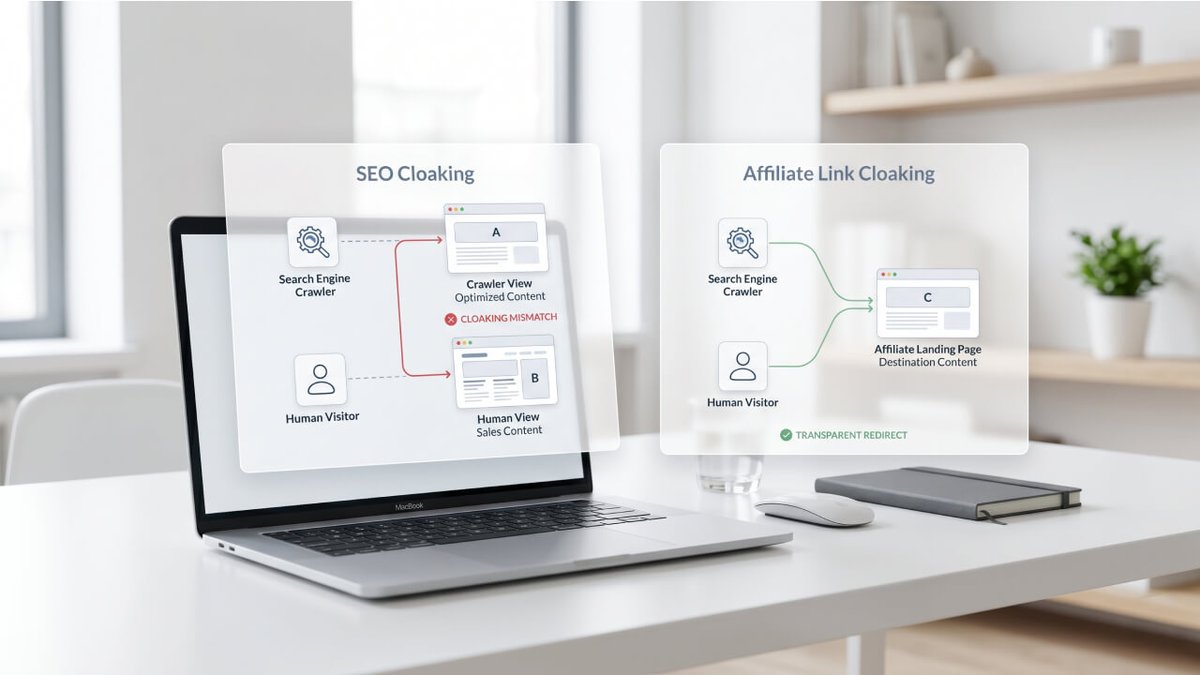
"Cloaking website" is the highest-volume keyword in this topic cluster (720 MSV) and causes genuine confusion because it shares a name with affiliate link cloaking while describing something entirely opposite.
Search engine (black-hat) cloaking means showing different content to search engine crawlers than to human visitors — for example, keyword-rich text to Googlebot, spam to users. This is explicitly prohibited by Google's spam policies and can result in manual deindexing.
Affiliate link cloaking (white-hat) means creating a branded redirect from your domain to a merchant's page. The destination is identical for all visitors. There is no deception involved.
The test is simple:
Is the same content served to both crawlers and users?
If yes — legitimate affiliate cloaking.
If no — black-hat SEO cloaking.
Google's official position is that affiliate links should use rel="sponsored" to signal a commercial relationship. This is an informational attribute, not a penalty. Correctly marked affiliate links will not harm your rankings.
Legal & Compliance Guide: FTC, SEO Attributes, and Network Policies
FTC Disclosure Requirements
The FTC's Endorsement Guides require that any material connection — including affiliate commissions — be disclosed clearly and conspicuously, close to the relevant recommendation. This applies across all channels: blog posts, email, YouTube, social media.
"Clearly and conspicuous" means the disclosure must be impossible to miss and visible before or at the same time as the recommendation — not buried at the bottom of the page. A compliant example: "This post contains affiliate links. I may earn a commission if you purchase through my links, at no extra cost to you." — placed above the first affiliate link. (You can read more here).
Cloaking does not remove the disclosure obligation. A clean-looking URL is still an affiliate link. The FTC's 2023 updates expanded the definition of "material connection" to include promo codes, gifted products, and commission-based links across all platforms.
SEO Link Attributes
Google introduced rel="sponsored" in 2019 specifically for affiliate and paid links.
Both rel="nofollow" and rel="sponsored" are acceptable; rel="sponsored" is Google's preferred implementation.
Failing to tag large volumes of affiliate links with these attributes can attract a link spam manual action. Pretty Links and ThirstyAffiliates apply rel="nofollow sponsored" automatically when the option is checked during setup — confirm this is enabled in your plugin settings.
GDPR and cookie consent considerations
If you publish content accessible to visitors in the European Union, the redirect tracking performed by cloaking plugins has privacy implications you need to address.
When a visitor clicks a cloaked link, ThirstyAffiliates and Pretty Links both log click data — IP address, timestamp, user agent, and referring page — to produce the click reports in their dashboards.
Under GDPR, this constitutes personal data processing. Most affiliate marketers handle this in one of two ways: either disclose this tracking in your Privacy Policy under a dedicated “Affiliate Links and Tracking” section (relying on legitimate interest as the legal basis for analytics logging), or configure your cookie consent banner to gate the redirect tracking script behind consent.
Digistore24’s own tracking — the cookie set at the point of the first click to attribute purchases within the 180-day window — is similarly subject to GDPR consent requirements if your visitors are in the EU. Review your privacy policy and consent mechanism to ensure they accurately describe both layers of tracking: your plugin’s click logging and Digistore24’s attribution cookie.
Network Policies: Key Exceptions
Link Cloaking Best Practices
- Naming conventions: Use /go/ or /recommends/ as your standard prefix — professional, recognizable, and easy to manage in bulk with a single robots.txt rule.
- Descriptive slugs: /go/digistore-keto-offer is far easier to audit six months from now than /go/link47.
- Regular audits: Schedule quarterly link checks. ThirstyAffiliates Pro's automatic 404 checker and Pretty Links' export function make this manageable at scale.
- Link expiry for promotions: Digistore24 vendors frequently run launch-window offers with elevated commissions. Pretty Links Pro and ThirstyAffiliates Pro both allow expiry dates on cloaked links, automatically redirecting to a custom page once the offer closes.
- Social media: Cloaked links look more credible in Instagram captions, Facebook posts, and Pinterest descriptions, and are less likely to be flagged by platform moderation tools that scan for known affiliate network domains.
- Email newsletters: Raw Digistore24 affiliate URLs sent inside email campaigns are frequently scanned by spam filters that maintain databases of known affiliate network domains. A cloaked link on your own domain passes through most filters cleanly because your sending domain is what gets evaluated, not the final destination.
- Always include a plain-text affiliate disclosure in the email body, and test deliverability with a tool like Mail-Tester or GlockApps before deploying to your full list.
- Note that some email service providers (ESPs), including Mailchimp, have specific policies on affiliate links in newsletters; check your ESP’s terms and use your cloaked domain link rather than the raw affiliate URL.
- YouTube and podcast creators: A cloaked slug like yourdomain.com/go/offer solves two problems that raw affiliate URLs create in video and audio contexts. First, it’s speakable — you can say “head to yourdomain.com/go/keto” in a video and your audience can type it accurately. When the vendor updates their funnel URL, you change one entry in your plugin dashboard — the link in every video description and podcast episode remains unchanged and continues to work.
- Scaling your link library: As your portfolio grows past 50–100 cloaked links, maintaining them manually becomes a real operational burden. Build a simple naming taxonomy from day one: prefix/niche-vendor-format (e.g., go/fitness-ds24keto-text or go/finance-ds24tradepro-video). Both ThirstyAffiliates and Pretty Links support link categories and CSV export — use these to run quarterly audits where you export all links, spot-check the active ones against live vendor pages, and archive any whose offers have ended.
Next Steps
You now have a complete link cloaking system: the method that fits your platform, the plugin that fits your workflow, the compliance framework that protects your business, and a clear understanding of affiliate decloaking that most guides skip entirely.
The Digistore24 Affiliate Marketing Industry Report covers the full current landscape — market trends, platform data, and strategic positioning — in one resource.
FAQ
What's the difference between link cloaking and a URL shortener?
A URL shortener creates a link on a third-party domain (e.g., bit.ly/xyz). Link cloaking creates a redirect on your own domain. Cloaking gives you full branding control, platform independence, and better attribution — URL shorteners provide none of these for affiliate use.
Will link cloaking hurt my SEO?
No — if done correctly. Apply rel="nofollow sponsored" (most plugins do this automatically), add Disallow: /go/ to robots.txt, and use 301 redirects for permanent links.
Is it legal to cloak affiliate links?
Yes. Redirecting a URL is standard web practice. The legal obligation is FTC disclosure: clearly inform your audience you may earn a commission — regardless of whether links are cloaked or raw.
Can I cloak Amazon affiliate links?
No. Amazon's Operating Agreement explicitly prohibits masking the Amazon destination. Use Amazon's native amzn.to shortlinks, or ThirstyAffiliates' Smart Uncloaking feature.
What is affiliate decloaking and should I worry about it?
Decloaking is the process of reverse-engineering a cloaked link to reveal the raw affiliate URL — used by networks for compliance and by bad actors for commission theft. Protect yourself with JavaScript redirects, non-descriptive slugs, and Digistore24's campaign key tracking system.
Do I need to disclose cloaked affiliate links?
Yes — always. A clean URL does not remove the FTC disclosure requirement. The disclosure must be clear, conspicuous, and visible before the recommendation.
Which is the best free plugin for beginners?
Both Pretty Links and ThirstyAffiliates have solid free tiers. Pretty Links is simpler for first-time affiliates; ThirstyAffiliates is better if you anticipate needing Smart Uncloaking for Amazon or more marketer-focused features.
Can I cloak Digistore24 affiliate links?
Yes — fully supported. Use your Digistore24 promolink as the destination URL in any cloaking setup, confirm your redirect chain passes it unchanged, and test attribution by checking for your affiliate ID on the order form.
How do I verify cloaked links are working?
Open browser developer tools (F12 → Network tab), click the cloaked link, and confirm a 301 or 302 response. Or use redirect-checker.org — paste your URL, confirm the redirect chain, and verify your affiliate ID appears in the destination.
Do I need to add cloaked links to robots.txt?
Yes. Add Disallow: /go/ (or your chosen prefix) to prevent search engines indexing your redirect folder and to preserve crawl budget for your actual content. Most plugins can automate this.