The affiliate marketing landscape changed forever in July 2023 when Google officially retired Universal Analytics in favor of Google Analytics 4.
For beginner affiliates, this transition represents both a significant challenge and an unprecedented opportunity to gain deeper insights into marketing performance. Unlike its predecessor, Google Analytics 4 introduces an event-based data model that captures every user interaction as a discrete event. This provides far more granular visibility into how visitors engage with your affiliate website.
This shift allows you to track affiliate link clicks with greater precision, understand the complete customer journey, and optimize campaigns using machine learning-powered insights. These advantages are especially valuable when your goal is to maximize affiliate earnings.
GA4 also enables affiliates to track and analyze performance across multiple digital channels. This delivers a comprehensive view of customer engagement, helping you measure marketing effectiveness across platforms.
The urgency of mastering GA4 cannot be overstated.
Standard Universal Analytics properties stopped collecting data entirely, leaving affiliates who failed to migrate effectively flying blind.
Affiliates who embrace GA4 gain access to enhanced measurement features, improved privacy compliance, and advanced data analysis tools. These capabilities can dramatically improve marketing performance.
This comprehensive guide walks you through everything you need to know about GA4 for affiliate marketing success.
It covers everything from initial setup to advanced optimization strategies.
Introduction to Google Analytics 4

Google Analytics 4 (GA4) is the latest evolution of Google Analytics.
It is designed to give marketers a holistic view of user behavior and marketing performance across websites and apps.
GA4 uses a flexible event-based system that allows tracking of a wide range of interactions, including affiliate link clicks. This enables you to create custom events tailored specifically to affiliate marketing needs. You canmonitor exactly how users engage with your content and which affiliate links drive the most value. By leveraging GA4’s powerful data insights, you can optimize marketing strategies, improve user experience, and boost affiliate revenue through informed, data-driven decisions.
What is Google Analytics 4 for Affiliate Marketing?
Google Analytics 4 represents a fundamental reimagining of how website analytics work, built from the ground up as an event-based analytics system designed for cross-platform tracking across websites and mobile apps.
For affiliate marketers, including loyal and top-performing Digistore24 users, this architectural shift unlocks powerful new capabilities for understanding user behavior and optimizing conversion funnels. GA4 provides detailed insights into user activity, allowing affiliates to monitor how visitors interact with their content and affiliate links throughout the customer journey.
Key Differences from Universal Analytics
The transition from Universal Analytics to Google Analytics 4 brings several critical changes that directly impact affiliate tracking:
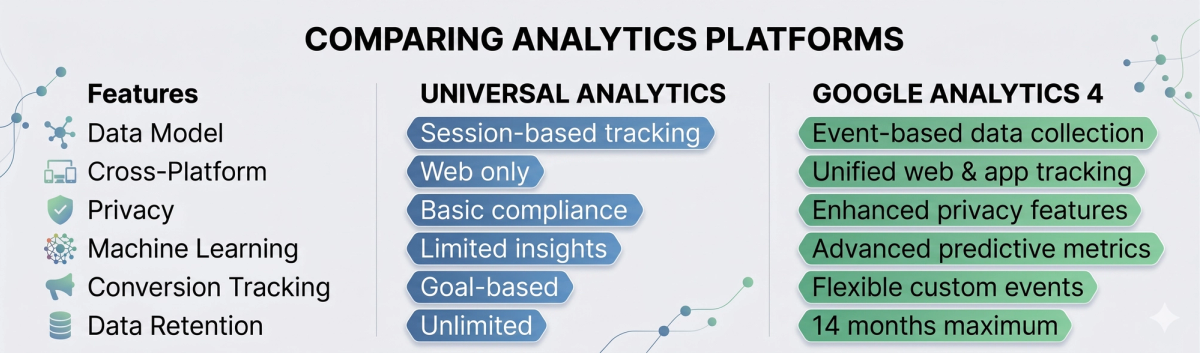
The session-based model of Universal Analytics grouped user interactions into defined sessions with clear start and end times. GA4’s event-driven approach treats every user interaction—page views, affiliate link clicks, video plays, form submissions—as individual events that can be analyzed independently or combined to understand the complete user journey. GA4 also enables affiliates to analyze the page path users take before clicking affiliate links, offering deeper insights into user navigation and content performance.
Specific Benefits for Affiliate Marketers

Google Analytics 4 delivers several advantages that directly address common affiliate marketing challenges:
Enhanced Conversion Attribution: GA4’s data-driven attribution model uses machine learning to assign conversion credit more accurately across multiple touchpoints. This helps affiliates understand which content pieces and traffic sources truly contribute to affiliate clicks and subsequent conversions.
Improved Outbound Link Tracking: Enhanced measurement automatically tracks outbound clicks as events, making it significantly easier to monitor affiliate link performance without complex custom coding.
Cross-Device Journey Tracking: GA4’s user-centric approach provides better visibility into how users interact with your affiliate content across different devices and sessions before clicking affiliate partners’ links.
Privacy-First Data Collection: Built-in consent management and cookieless measurement options help affiliates maintain compliance with GDPR and other privacy regulations while still gathering valuable insights.
User reports in GA4 offer affiliates valuable demographic and behavioral data, including information on user interests, device types, and geographic location. This helps refine content and marketing strategies for better results.
The event-driven model particularly benefits affiliate marketers because it captures the nuanced ways users engage with affiliate content. Rather than simply seeing that someone visited a product review page, you can track specific events like scrolling to pricing information, clicking product images, comparing multiple products, and ultimately clicking affiliate links—all within a single comprehensive user journey.
Understanding Affiliate Links

Affiliate links are special URLs that include a unique identifier for each affiliate, making it possible to track which referrals and sales are generated by specific partners. These links are the backbone of affiliate marketing, as they ensure that affiliates are properly credited for their marketing efforts. As the successful use of UTMs also shows, tracking and analyzing traffic to key destinations in the funnel is vital.
So how does it work here?
In Google Analytics 4, you can track affiliate links using custom events, which capture detailed data about each link click: the link URL, the affiliate partner involved, and the user behavior leading up to the click. By monitoring affiliate link clicks and analyzing this data, you gain a clearer picture of how your affiliate marketing efforts are performing, which partners and content drive the most engagement, and where to focus your optimization efforts for maximum impact.
Setting Up GA4 for Affiliate Marketing Success

Implementing Google Analytics 4 for affiliate tracking requires systematic configuration to ensure you capture all relevant user interactions and conversions.
After accessing your Google Analytics account and navigating to the Admin section, look for the gear icon—this is where you can access advanced settings and configuration options. This section provides a complete step-by-step setup process tailored specifically for affiliate marketers.
Creating Your GA4 Property
Begin by accessing your Google Analytics account and navigating to the Admin section.
If you’re transitioning from Universal Analytics, you’ll find the GA4 Setup Assistant at the top of the Property menu, which streamlines the migration process.
When creating a new GA4 property, the system establishes a fresh data collection environment without historical data transfer. This limitation means you’ll start with a clean slate, making it crucial to implement tracking correctly from day one to avoid data loss during the transition period.
During property creation, select “Web” as your platform and configure your web data stream with your affiliate website’s URL. The system will generate a unique Measurement ID following the format G-XXXXXXXXXX, which you’ll need for all tracking implementations.
Essential Configuration for Affiliate Tracking
Enhanced Measurement should be enabled immediately.
This automatically tracks critical events:
- Outbound clicks (affiliate links)
- Page views
- Scroll depth
- Site search
- Video engagement
Configure Data Retention
Set retention to 14 months via Admin → Data Settings → Data Retention.
Define Conversion Events
Start with:
- affiliate_link_click
- page_view
- engaged_sessions
To create a custom affiliate event:
- Go to Events
- Click Create Event
- Set conditions:
- event_name = click
- link_url contains affiliate domain
- Save the event
Google Tag Manager Integration
Google Tag Manager provides advanced tracking flexibility.
It simplifies affiliate event management and scalability.
Steps:
- Create a GA4 Event tag
- Add your Measurement ID
- Configure outbound click triggers
Add custom parameters:
- click_url
- link_url
- page_path
- click_element
Use Preview Mode to test tracking before publishing.
This parameter configuration enables detailed analysis of which content drives affiliate clicks and which link placements perform best across your affiliate website.
Before publishing any changes, use preview mode in Google Tag Manager to test and verify that your tags fire correctly and affiliate link clicks are tracked as expected.
Privacy Compliance and Consent Management
Configure GA4’s consent mode to respect user privacy preferences while maintaining data collection capabilities. This setup is particularly important for affiliate marketers operating internationally or targeting privacy-conscious audiences.
Enable Google consent mode v2 to adjust tracking behavior based on user consent status. When users deny cookies, GA4 can still provide aggregated insights using cookieless measurement techniques, though individual user tracking will be limited.
Set up proper consent management integration if you use third-party consent management platforms. This ensures your affiliate tracking complies with GDPR, CCPA, and other privacy regulations while maximizing data collection from consenting users.
Tracking Affiliate Links with Custom Events
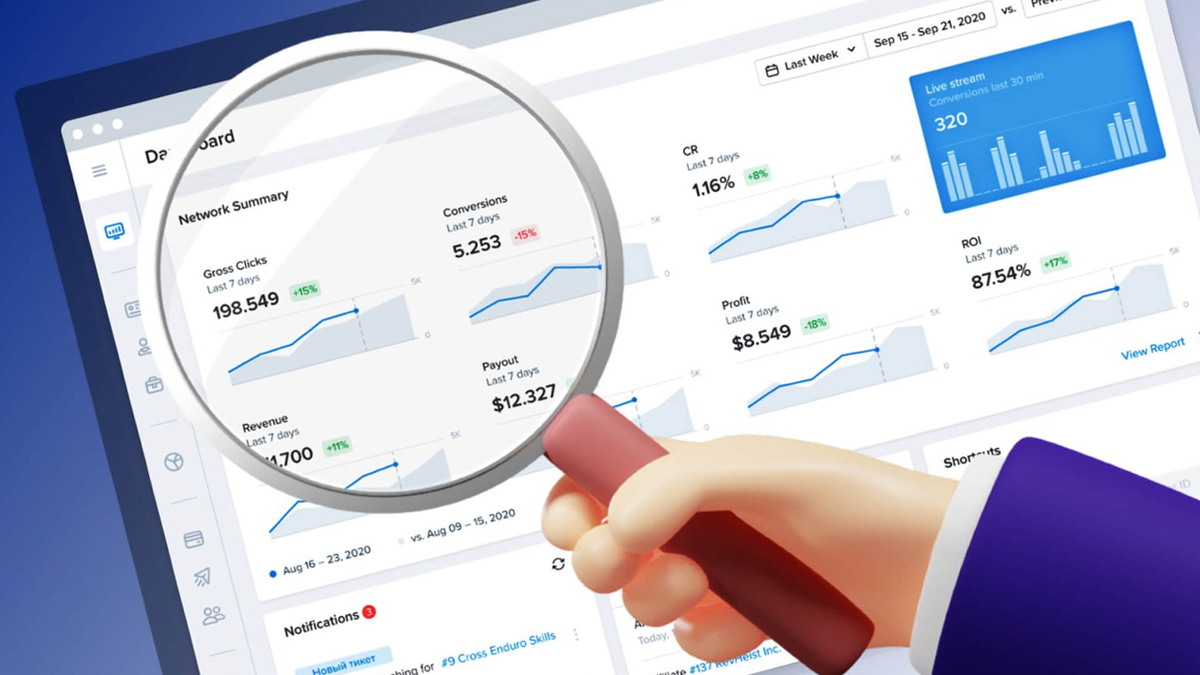
To effectively track affiliate links in Google Analytics 4, you’ll want to set up custom events that capture every click on your affiliate URLs.
Start by creating a new event in GA4, giving it a clear event name such as “affiliate_link_click.” Set the event conditions so that it triggers whenever the link_url contains the domain of your affiliate partner. This ensures that every time a user clicks an affiliate link, the event is recorded in your analytics. To verify that your custom events are firing correctly, use the Google Analytics Debugger extension or the built-in Google Analytics Debugger.
This tool allows you to test your setup in real time, ensuring that you’re accurately tracking affiliate link clicks and collecting reliable data for your reports. With these custom events in place, you’ll be able to track affiliate links, analyze performance, and make informed decisions to improve your affiliate marketing strategy. Steps:
- Create an event named affiliate_link_click
- Trigger when link_url contains affiliate domain
- Verify using Google Analytics Debugger
Enabling Outbound Clicks and Click Events
To start tracking affiliate link clicks in GA4, it’s important to enable outbound clicks and click events within your web data stream.
Head to the Admin section of your Google Analytics account, select your data stream, and make sure Enhanced Measurement is turned on. This feature automatically tracks outbound clicks—any time a user clicks a link that leads away from your website, such as an affiliate link.
Click events are also captured whenever a user interacts with a link, providing detailed data on user behavior. By enabling these features, you can easily track affiliate link clicks and use the traffic acquisition report to see which sources are driving the most valuable traffic to your site. The acquisition report and other data stream insights help you understand how users are interacting with your affiliate links, allowing you to refine your marketing strategies and maximize your results.
Essential GA4 Metrics and Reports for Affiliate Marketers

Understanding which metrics matter most for affiliate marketing success helps you focus your analysis on data that directly impacts revenue generation.
GA4 provides numerous reports and exploration tools, but certain metrics deserve priority attention from beginner affiliates. Monitoring affiliate data in GA4 allows marketers to track affiliate link clicks, conversions, and partner performance for more effective optimization.
Traffic Acquisition Reports
The traffic acquisition report reveals which channels drive visitors to your affiliate website and how different traffic sources perform in terms of engagement and conversions. This report shows session default channel group data, breaking down traffic into organic search, direct, referral, social, email, and paid search categories.
For affiliate marketers, pay special attention to:
- Organic search performance: Which keywords and content pieces attract search traffic
- Referral traffic quality: How visitors from other websites engage with your affiliate content
- Social media effectiveness: Whether social media marketing efforts translate into affiliate clicks
- Direct traffic analysis: Returning visitors who demonstrate strong brand affinity
The user acquisition section within these reports shows new users versus returning users, helping you understand whether your affiliate marketing efforts successfully attract fresh audiences or primarily serve existing followers.
Engagement Reports and User Behavior Analysis
Engagement reports provide crucial insights into how users interact with your affiliate content before clicking outbound links. Key metrics include:
Engaged Sessions: Sessions lasting longer than 10 seconds, having conversion events, or including multiple page views. For affiliate marketers, high engagement typically correlates with higher affiliate link click rates.
Average Engagement Time: How long users spend actively engaging with your content. Product reviews and comparison articles should show higher engagement times than brief news posts.
Events per Session: The number of interactions per visit, including page views, affiliate link clicks, and other custom events you’ve configured.
Pages per Session: How many pages users visit during a single session, indicating content depth and internal linking effectiveness.
Conversion Data and Affiliate Event Tracking
Your conversion reports show how effectively your content drives valuable actions. Focus on these conversion-related metrics:
- Affiliate link clicks: Direct measurement of outbound clicks to affiliate partners
- Conversion rate by traffic source: Which channels produce the highest-converting visitors
- Path to conversion: The sequence of pages users visit before clicking affiliate links
- Event completion rates: How many visitors complete desired actions across different content types
When setting up custom events or tracking, ensure your events use the same parameters as the original click events, such as link_url and affiliate_link_clicks, to maintain consistency and enable accurate affiliate performance analysis.
Create custom reports combining conversion data with user demographics and traffic sources to identify your most valuable audience segments. This analysis helps optimize content creation and traffic acquisition strategies.
Audience Insights for Better Targeting
GA4’s audience reports reveal demographic, geographic, and interest data about your visitors. For affiliate marketers, this information guides product selection and content strategy decisions:
Demographics Overview: Age and gender distribution of your audience, helping you select age-appropriate affiliate products and adjust content tone accordingly.
Geographic Data: Countries and regions where your audience concentrates, important for selecting affiliate programs with appropriate geographic coverage and currency options.
Interest Categories: What topics and product categories your audience finds most engaging, guiding affiliate program selection and content planning.
Technology Information: Device types, browsers, and operating systems your audience uses, ensuring your affiliate website and tracking work properly across all platforms.
Real-Time Reporting for Campaign Monitoring
Real-time reports provide immediate visibility into current website activity, essential for monitoring affiliate campaign launches, promotional activities, and content performance as it happens.
The real-time report shows:
- Active users currently on your site: Immediate traffic volume feedback
- Top pages being viewed: Which content attracts current attention
- Conversion events occurring now: Live affiliate link clicks and other valuable actions
- Traffic source breakdown: Where current visitors originate
Use real-time reporting to verify that new content performs as expected, confirm that affiliate tracking implementations work correctly, and monitor traffic spikes from social media posts or email campaigns.
Custom Reports and Explorations
GA4’s Explorations feature enables creation of custom reports tailored specifically to affiliate marketing needs. Build explorations that combine metrics not available in standard reports:
Affiliate Performance Analysis: Compare affiliate link clicks across different product categories, content types, and traffic sources in a single view.
Content Effectiveness Reports: Analyze which articles generate the most engaged sessions, affiliate clicks, and return visits.
Conversion Funnel Analysis: Track user progression from initial page view through multiple content pages to affiliate link clicks.
Cohort Analysis: Examine how user behavior changes over time, identifying whether building relationships with readers improves conversion likelihood.
The ability to create custom report configurations ensures you can answer specific business questions that standard reports don’t address, providing deeper insights into what drives affiliate marketing success for your unique audience and content strategy.
GA4 Optimization Strategies for Beginner Affiliates
Strategies for maximizing affiliate revenue typically require continuous optimization based on data analysis and strategic testing. GA4 provides sophisticated tools for identifying improvement opportunities and measuring the impact of changes to your affiliate marketing approach. It is also crucial to implement and test new events in GA4 to ensure all relevant affiliate interactions, such as link clicks, are accurately tracked and analyzed.
Audience Segmentation for Higher Conversions
Effective audience segmentation reveals which visitor types generate the most affiliate revenue, enabling you to focus your efforts on attracting and converting your most valuable traffic segments.
Create custom audiences based on user behavior patterns:
High-Intent Users: Visitors who view multiple product pages, spend significant time on affiliate content, and demonstrate purchase-ready behavior through their browsing patterns.
Brand Loyalists: Returning users who consistently engage with your content and click affiliate links, representing your most reliable revenue source.
Geographic Segments: Users from regions where your affiliate partners operate, ensuring you promote relevant products and services.
Device-Based Segments: Mobile versus desktop users often exhibit different behavior patterns, requiring tailored content and affiliate link placement strategies.
Use these audience segments to customize content recommendations, adjust affiliate product selection, and optimize user experience for each group’s preferences and behavior patterns.
Setting Up Performance Alerts
Configure custom alerts to notify you of significant changes in affiliate performance, enabling rapid response to both opportunities and potential issues.
Essential alerts for affiliate marketers include:
- Affiliate click volume drops: Indicates potential tracking issues or content performance problems
- Traffic source changes: Sudden increases or decreases in traffic from specific channels
- Conversion rate fluctuations: Significant changes in affiliate link click rates
- Revenue attribution shifts: Changes in which content drives the most valuable traffic
Set alert thresholds based on your historical performance data, typically triggering notifications for changes exceeding 20-30% of normal levels. This ensures you receive actionable alerts without excessive notification frequency.
Leveraging Machine Learning Insights
GA4’s machine learning capabilities provide predictive insights that help optimize affiliate marketing strategies without requiring advanced statistical knowledge.
Predictive Metrics: GA4 automatically calculates purchase probability and churn probability for your users, helping you identify which visitors are most likely to engage with affiliate content and which might stop visiting your site.
Conversion Probability: Understanding which users show high conversion likelihood allows you to prioritize affiliate content promotion and optimize user experience for these valuable visitors.
Trending Content Identification: GA4’s insights automatically identify content pieces gaining or losing momentum, enabling you to capitalize on rising interest or address declining performance.
Audience Suggestions: The platform automatically identifies user segments with similar behavior patterns, revealing new audience opportunities you might not have considered.
A/B Testing Affiliate Content Performance
Systematic testing of affiliate content helps identify which approaches generate the highest conversion rates and revenue per visitor.
Test these critical elements:
Affiliate Link Placement: Compare conversion rates for affiliate links placed in content headers, within product descriptions, in dedicated recommendation sections, and in content conclusions. When testing, click two outbound links (such as different affiliate links) and verify in GA4 that each registers as a separate event, ensuring accurate tracking of multiple affiliate interactions.
Call-to-Action Language: Test different phrases for encouraging affiliate link clicks, measuring which language resonates most effectively with your audience.
Content Length and Format: Compare performance between detailed product reviews, brief recommendation lists, comparison tables, and video content formats.
Visual Elements: Test whether product images, comparison charts, or embedded videos improve affiliate link click rates.
Use GA4’s conversion reporting to measure test results accurately, ensuring you have sufficient data collection time to identify statistically significant differences between content variations.
GDPR Compliance and Consent Management
Maintaining privacy compliance while optimizing affiliate tracking requires careful attention to consent management and user privacy preferences.
Implement these compliance best practices:
Transparent Consent Requests: Clearly explain how analytics data helps improve content relevance and user experience, encouraging voluntary consent for tracking.
Consent Mode Configuration: Set up GA4’s consent mode to respect user preferences while maintaining basic analytics functionality for non-consenting users.
Data Minimization: Only collect data directly relevant to improving affiliate marketing performance, avoiding unnecessary personal information gathering.
Regular Compliance Audits: Periodically review your data collection practices to ensure continued compliance with evolving privacy regulations.
Alternative Measurement Methods: Develop server-side tracking capabilities for affiliate links to maintain basic performance measurement even when browser-based tracking is limited.
Consider using first-party data collection methods like email subscriptions and account creation to maintain audience insights that don’t rely entirely on browser-based tracking. This approach provides more reliable long-term data while respecting user privacy preferences.
Advanced Event Configuration
Beyond basic affiliate link tracking, configure sophisticated custom events that provide deeper insights into user engagement and conversion paths. Setting up new affiliate events in GA4 allows for more granular tracking of affiliate link clicks across multiple domains and partner programs.
Content Engagement Events: Track when users scroll to specific sections of affiliate content, spend significant time reading product details, or interact with comparison features.
Product Interest Events: Monitor which specific products or product categories generate the most user attention, even before affiliate link clicks occur.
Journey Milestone Events: Identify key points in the user journey that correlate with eventual affiliate conversions, such as viewing pricing information or reading customer reviews.
These advanced events enable more nuanced analysis of what drives affiliate success, helping you optimize content strategy and user experience design for maximum conversion potential.
Regular analysis of these optimization strategies ensures your affiliate marketing efforts continue improving over time, adapting to changing user preferences and market conditions while maximizing revenue generation from your existing traffic.
Best Practices for GA4 Affiliate Tracking
Remember: reliable data depends on consistent best practices.
Key practices:
- Use custom affiliate events
- Test with GA Debugger
- Review reports regularly
- Understand outbound link tracking
This ensures actionable insights and improved performance.
Conclusion and Next Steps
Mastering Google Analytics 4 has become essential for affiliate marketing success. The platform’s event based data model, machine learning insights, and enhanced privacy compliance features provide unprecedented opportunities for affiliates who invest time in proper implementation and optimization.
The transition from Universal Analytics represents more than a simple platform change — it’s an opportunity to fundamentally improve how you understand and optimize your affiliate marketing efforts. GA4’s sophisticated tracking capabilities, predictive analytics, and cross-platform measurement enable data-driven decisions that can significantly impact your commission earnings and long-term business growth.
- Implement the basic GA4 setup outlined in this guide
- Prioritize accurate affiliate link tracking from the start
- Configure essential conversion events tied to affiliate performance
- Build familiarity with standard reports and core metrics
- Gradually explore advanced features such as custom events, audience segmentation, and machine learning insights
- Commit to monthly performance reviews using GA4 data
- Identify traffic and conversion trends over time
- Spot optimization opportunities in content and link placement
- Detect underperforming pages or traffic sources early
- Continuously adapt to changing user behavior and market conditions
For continued learning and advanced GA4 implementation, consider exploring Google’s Analytics Academy courses, experimenting with the GA4 demo account, and joining affiliate marketing communities where practitioners share optimization strategies and troubleshooting solutions. The investment in GA4 expertise will pay dividends as you develop more sophisticated affiliate marketing campaigns and achieve higher conversion rates across all your promotional efforts.
FAQ
What is Google Analytics 4 (GA4)?
Google Analytics 4 (GA4) is Google’s latest analytics platform that uses an event-based data model to track user behavior across websites and apps. It replaced Universal Analytics in July 2023.
Why is GA4 important for affiliate marketers?
GA4 allows affiliates to:
- Track affiliate link clicks precisely
- Understand the full customer journey
- Analyze cross-device behavior
- Use machine learning insights for optimization
- Maintain GDPR and privacy compliance
Without GA4, affiliates risk losing visibility into performance data.
What is the main difference between GA4 and Universal Analytics?
The biggest difference is the tracking model:
- Universal Analytics: Session-based
- GA4: Event-based
In GA4, every interaction—page views, clicks, scrolls, video plays—is tracked as an event, giving affiliates more granular performance insights.
How does GA4 track affiliate link clicks?
Affiliate links can be tracked using:
- Enhanced Measurement (automatic outbound click tracking)
- Custom events (e.g., affiliate_link_click)
- Google Tag Manager triggers
You can configure an event to fire whenever a link URL contains your affiliate partner’s domain.